
音乐党福音!大善人cloudflare上免费部署音乐播放器
今天我们利用cloudflare搭建音乐🎵播放器,省心省钱!
播放器一:(步骤)
✅ Cloudflare Pages
Fork 或克隆本仓库(点击)。
按照 Cloudflare Pages 文档创建站点,并将本仓库作为构建来源或直接上传静态资源。
部署完成后,通过 Cloudflare Pages 分配的域名访问站点即可体验播放器。
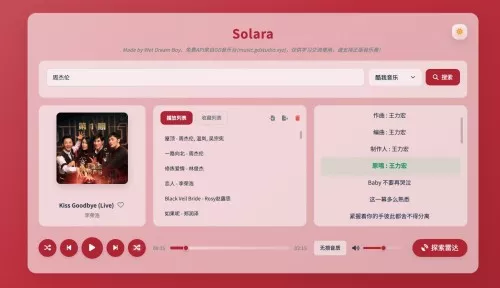
⬆️ 配置提示
API 基地址定义在 functions/proxy.ts 中的第1行,可替换为自建接口域名。
默认主题、播放模式等偏好可在 state 初始化逻辑中按需调整。
☁️ Cloudflare D1 绑定与建表
在 Cloudflare Dashboard 的 Workers & Pages → D1 → Create 中新建数据库,建议命名为 solara-db(名称可自定)。
打开 Pages 项目设置,依次进入 Settings → Functions → Bindings → Add binding → D1 Database:
Binding name 填写 DB(必须与 functions/api/storage.ts 中的环境变量一致)。
D1 Database 选择上一步创建的数据库并保存。
在数据库详情页切换到 Query 标签页,执行下方建表语句初始化两个独立的键值存储表(播放数据与收藏数据分离):
CREATE TABLE IF NOT EXISTS playback_store (
  key TEXT PRIMARY KEY,
  value TEXT,
  updated_at TEXT DEFAULT CURRENT_TIMESTAMP
);

CREATE TABLE IF NOT EXISTS favorites_store (
  key TEXT PRIMARY KEY,
  value TEXT,
  updated_at TEXT DEFAULT CURRENT_TIMESTAMP
);
重新部署或预览站点。前端会优先检测 D1 绑定:播放状态、播放列表等写入 playback_store,收藏相关写入 favorites_store;未绑定时自动退回浏览器 localStorage。
访问密码:Cloudflare Pages: 在项目的 Settings → Functions → Environment variables 中新增名为 PASSWORD 的环境变量,值为希望设置的访问口令。
本项目采用 CC BY-NC-SA 协议,禁止任何商业化行为,任何衍生项目必须保留本项目地址并以相同协议开源。
附录项目:js代码
export default {
  async fetch(request, env, ctx) {
    const htmlContent = `
<!DOCTYPE html>
<html lang="zh-CN">
<head>
    <meta charset="UTF-8">
    <meta name="viewport" content="width=device-width, initial-scale=1.0, user-scalable=yes">
    <title>天空音乐网</title>
    <script src="https://cdn.tailwindcss.com"></script>
    <script src="https://unpkg.com/vue@3/dist/vue.global.js"></script>
    <script src="https://unpkg.com/axios/dist/axios.min.js"></script>
    <link href="https://fonts.googleapis.com/css2?family=Inter:wght@400;600;700&display=swap" rel="stylesheet">
    <style>
        * { font-family: 'Inter', system-ui, -apple-system, sans-serif; }
        @keyframes gradientMove { 0% { background-position: 0% 50%; } 50% { background-position: 100% 50%; } 100% { background-position: 0% 50%; } }
        body { background: linear-gradient(-45deg, #0f0c29, #302b63, #4e085f, #24243e); background-size: 400% 400%; animation: gradientMove 15s ease infinite; min-height: 100vh; color: white; transition: background 0.5s; }

        .marquee-container { position: fixed; top: 0; left: 0; width: 100%; background: rgba(0, 0, 0, 0.6); backdrop-filter: blur(15px); padding: 12px 0; z-index: 100; overflow: hidden; border-bottom: 1px solid rgba(255,255,255,0.1); }
        .marquee { white-space: nowrap; display: inline-block; animation: marquee 25s linear infinite; padding-left: 100%; }
        .marquee a { color: #fff; font-weight: bold; text-decoration: none; padding: 8px 30px; font-size: 13px; display: inline-block; background: rgba(255, 255, 255, 0.05); border-radius: 30px; margin: 0 10px; transition: all 0.3s ease; border: 1px solid rgba(255,255,255,0.1); }
        @keyframes marquee { 0% { transform: translateX(0); } 100% { transform: translateX(-100%); } }

        .glass-modern { background: rgba(255, 255, 255, 0.03); backdrop-filter: blur(30px); border: 1px solid rgba(255, 255, 255, 0.08); box-shadow: 0 25px 50px -12px rgba(0, 0, 0, 0.5); }
        .quality-btn-active { background: linear-gradient(135deg, #a855f7, #ec489a); box-shadow: 0 0 15px rgba(168, 85, 247, 0.5); border-color: transparent !important; }

        .rotate-slow { animation: spin 20s linear infinite; }
        .rotate-paused { animation-play-state: paused; }
        @keyframes spin { from { transform: rotate(0deg); } to { transform: rotate(360deg); } }

        /* 硬件加速的频谱动效 */
        .visualizer-container { height: 160px; display: flex; align-items: flex-end; justify-content: center; gap: 5px; padding: 20px; }
        .v-bar {
            width: 4px;
            height: 100%;
            background: linear-gradient(to top, #a855f7, #ec489a);
            border-radius: 10px;
            opacity: 0.4;
            /* 使用 transform 进行 GPU 加速,避免重排版 */
            transform-origin: bottom;
            transform: scaleY(0.08);
            transition: transform 0.3s ease;
            will-change: transform;
        }
        .v-bar.active {
            opacity: 1;
            box-shadow: 0 0 15px rgba(236, 72, 154, 0.5);
            animation-name: rhythmBounce;
            animation-iteration-count: infinite;
            animation-direction: alternate;
            animation-timing-function: ease-in-out;
        }
        @keyframes rhythmBounce {
            0% { transform: scaleY(0.15); }
            100% { transform: scaleY(0.85); }
        }

        [v-cloak] { display: none; }
    </style>
</head>
<body class="pt-24 pb-12 px-4">
    <div class="marquee-container">
        <div class="marquee">
            <a href="https://h5.kitesim.co/#/pages/login/register?invite=KNEGHT&language=zh" target="_blank"> 多国 eSIM 套餐:全球旅行,流量无忧</a>
            <a href="https://bmhyk.vip/h5/#/pages/register/index?invit_url=daheng" target="_blank"> 优质 Emby 服务:海量 4K 蓝光影音</a>
            <a href="https://h5.kitesim.co/#/pages/login/register?invite=KNEGHT&language=zh" target="_blank"> 多国 eSIM 套餐:全球旅行,流量无忧</a>
        </div>
    </div>

    <div id="app" class="max-w-4xl mx-auto" v-cloak>
        <div class="text-center mb-10">
            <h1 class="text-5xl font-bold bg-gradient-to-r from-purple-300 via-pink-400 to-purple-300 bg-clip-text text-transparent">天空音乐网</h1>
            <p class="text-white/30 text-xs tracking-[0.5em] mt-3 uppercase">Feel The Rhythm</p>
        </div>

        <div v-if="currentSong" class="glass-modern rounded-[2.5rem] p-6 md:p-10 mb-8 border-white/5">
            <div class="flex flex-col md:flex-row gap-10 items-center">
                <div class="relative shrink-0">
                    <img :src="currentSong.cover" :class="['w-44 h-44 md:w-52 md:h-52 rounded-full object-cover rotate-slow border-4 border-white/10 shadow-2xl transition-transform duration-1000', {'rotate-paused': isPaused}]">
                    <div class="absolute inset-0 rounded-full border-[10px] border-black/30 pointer-events-none"></div>
                </div>

                <div class="flex-1 w-full overflow-hidden">
                    <div class="flex flex-wrap justify-between items-start mb-6 gap-4">
                        <div class="max-w-[60%]">
                            <h2 class="text-2xl font-bold truncate text-white">{{ currentSong.name }}</h2>
                            <p class="text-purple-400 font-medium text-sm mt-1">{{ currentSong.artist }}</p>
                        </div>
                        <div class="flex bg-black/40 p-1 rounded-xl border border-white/10 shadow-inner">
                            <button v-for="q in qualities" :key="q.value" @click="currentQuality = q.value; refreshPlay()"
                                class="px-3 py-1.5 rounded-lg text-[10px] font-bold transition-all uppercase"
                                :class="currentQuality === q.value ? 'quality-btn-active text-white' : 'text-white/30 hover:text-white'">
                                {{ q.label }}
                            </button>
                        </div>
                    </div>

                    <div class="visualizer-container mb-6 bg-black/20 rounded-3xl border border-white/5">
                        <div v-for="bar in staticBars" :key="bar.id"
                             class="v-bar"
                             :class="{'active': !isPaused}"
                             :style="{
                                animationDuration: bar.dur,
                                animationDelay: bar.del,
                                transform: isPaused ? 'scaleY(0.08)' : ''
                             }">
                        </div>
                    </div>

                    <div class="flex items-center gap-4">
                        <audio ref="player" :src="currentPlayUrl" @play="isPaused = false" @pause="isPaused = true" @ended="onSongEnded" controls autoplay class="w-full filter invert brightness-200 opacity-80"></audio>
                        <button @click="shareSong" class="p-3 bg-white/5 rounded-full border border-white/10 hover:bg-white/10 text-white/50 transition-colors" title="分享链接"></button>
                    </div>
                </div>
            </div>
        </div>

        <div class="glass-modern rounded-3xl p-6 mb-8">
            <div class="flex flex-col md:flex-row gap-4">
                <input v-model="keyword" @keyup.enter="searchMusic" type="text" placeholder="搜索歌曲、歌手..."
                    class="flex-1 pl-6 py-4 rounded-2xl bg-white/5 border border-white/10 outline-none focus:border-purple-500/50 transition-all text-sm text-white placeholder-white/20">
                <div class="flex gap-2">
                    <button @click="searchMusic" :disabled="loading" class="bg-gradient-to-r from-purple-600 to-pink-600 px-8 py-4 rounded-2xl font-bold flex items-center gap-2 hover:opacity-90 active:scale-95 transition-all text-white">
                        <span v-if="loading" class="animate-spin">◌</span> {{ loading ? '搜索中' : '开始搜索' }}
                    </button>
                    <button @click="toggleShuffle" class="p-4 rounded-2xl border border-white/10 transition-all" :class="isShuffle ? 'bg-pink-500 text-white shadow-lg' : 'bg-white/5 text-white/30'"></button>
                </div>
            </div>
            <div class="flex flex-wrap gap-2 mt-5">
                <span v-for="tag in ['周杰伦', '林俊杰', '周深', '陈奕迅', '邓紫棋', '大鱼']" @click="keyword = tag; searchMusic()"
                    class="px-3 py-1.5 rounded-lg bg-white/5 text-white/30 text-xs cursor-pointer hover:bg-white/10 hover:text-white transition-all">
                    # {{ tag }}
                </span>
            </div>
        </div>

        <div class="glass-modern rounded-3xl overflow-hidden mb-12">
            <div v-if="songs.length === 0 && !loading" class="p-20 text-center text-white/20 text-sm tracking-widest">
                输入关键词发现动听旋律
            </div>
            <div v-for="(song, idx) in songs" :key="song.id" @click="playSong(song)"
                class="p-5 flex items-center gap-4 cursor-pointer hover:bg-white/5 transition-all group border-b border-white/5 last:border-0"
                :class="{'bg-purple-500/10': currentSong && currentSong.id === song.id}">
                <div class="text-white/10 w-6 text-center font-mono text-xs group-hover:text-purple-400">{{ idx + 1 }}</div>
                <img :src="song.cover" class="w-12 h-12 rounded-lg object-cover shadow-lg transition-transform group-hover:scale-105">
                <div class="flex-1 min-w-0 ml-2">
                    <div class="text-sm font-semibold truncate group-hover:text-purple-300 transition-colors">{{ song.name }}</div>
                    <div class="text-white/30 text-[10px] truncate mt-1">{{ song.artist }}</div>
                </div>
                <div v-if="currentSong && currentSong.id === song.id" class="text-purple-400 text-[10px] animate-pulse font-bold">PLAYING</div>
            </div>
        </div>

        <transition name="fade">
            <div v-if="message" class="fixed bottom-10 left-1/2 -translate-x-1/2 bg-white text-black px-8 py-3 rounded-full font-bold shadow-2xl z-50 text-sm">{{ message }}</div>
        </transition>
    </div>

    <script>
        const { createApp, ref, onMounted } = Vue;
        const PROXY = 'https://proxy.api.030101.xyz/';

        createApp({
            setup() {
                const keyword = ref('');
                const songs = ref([]);
                const loading = ref(false);
                const currentSong = ref(null);
                const currentPlayUrl = ref('');
                const isPaused = ref(true);
                const isShuffle = ref(false);
                const currentQuality = ref('128k');
                const message = ref('');
                const qualities = [{ value: '128k', label: '标准' }, { value: '320k', label: '极高' }, { value: 'flac', label: '无损' }];

                // 一次性生成静态的动画参数,避免 JS 实时干预 DOM
                const staticBars = ref(Array.from({length: 32}, (_, i) => ({
                    id: i,
                    dur: (0.4 + Math.random() * 0.4) + 's', // 动画周期在 0.4s 到 0.8s 之间随机
                    del: (Math.random() * -1) + 's' // 使用负延迟,使动画立刻开始且相位不同
                })));

                const showMsg = (msg) => { message.value = msg; setTimeout(() => message.value = '', 2000); };

                const searchMusic = async () => {
                    if (!keyword.value.trim()) return;
                    loading.value = true;
                    try {
                        const postData = { req_1: { method: "DoSearchForQQMusicDesktop", module: "music.search.SearchCgiService", param: { num_per_page: 30, page_num: 1, query: keyword.value, search_type: 0 } } };
                        const res = await axios.post(PROXY + 'https://u.y.qq.com/cgi-bin/musicu.fcg', postData);
                        const list = res.data?.req_1?.data?.body?.song?.list || [];
                        songs.value = list.map(item => ({
                            id: item.id, mid: item.mid, name: item.name,
                            artist: item.singer?.map(s => s.name).join(', ') || '未知歌手',
                            cover: item.album?.mid ? \`https://y.gtimg.cn/music/photo_new/T002R300x300M000\${item.album.mid}.jpg\` : 'https://y.gtimg.cn/music/photo_new/T002R300x300M000000MkMni19ClKG.jpg'
                        }));
                    } catch (err) { showMsg('搜索服务繁忙'); }
                    loading.value = false;
                };

                const playSong = (song) => {
                    currentSong.value = song;
                    const qMap = { '128k': 'standard', '320k': 'exhigh', 'flac': 'lossless' };
                    currentPlayUrl.value = \`https://music.nxinxz.com/kgqq/tx.php?id=\${song.mid}&level=\${qMap[currentQuality.value]}&type=mp3\`;
                };

                const refreshPlay = () => { if (currentSong.value) playSong(currentSong.value); };
                const toggleShuffle = () => { isShuffle.value = !isShuffle.value; showMsg(isShuffle.value ? '已开启随机播放' : '已关闭随机播放'); };
                const onSongEnded = () => { if (isShuffle.value) playSong(songs.value[Math.floor(Math.random() * songs.value.length)]); };
                const shareSong = () => {
                    const url = \`\${window.location.origin}\${window.location.pathname}?mid=\${currentSong.value.mid}&name=\${encodeURIComponent(currentSong.value.name)}&artist=\${encodeURIComponent(currentSong.value.artist)}\`;
                    navigator.clipboard.writeText(url).then(() => showMsg(' 链接已复制'));
                };

                onMounted(() => {
                    keyword.value = '谢霆锋';
                    searchMusic();

                    const p = new URLSearchParams(window.location.search);
                    if (p.get('mid')) {
                        playSong({ mid: p.get('mid'), name: p.get('name'), artist: p.get('artist'), cover: 'https://y.gtimg.cn/music/photo_new/T002R300x300M000000MkMni19ClKG.jpg' });
                    }
                });

                return {
                    keyword, songs, loading, currentSong, currentPlayUrl, isPaused, isShuffle, currentQuality, message, qualities, staticBars,
                    searchMusic, playSong, toggleShuffle, onSongEnded, refreshPlay, shareSong
                };
            }
        }).mount('#app');
    </script>
</body>
</html>
    `;
    return new Response(htmlContent, { headers: { "content-type": "text/html;charset=UTF-8" } });
  }
};
以上就是在cloudflare上部署音乐播放器的详细方法,有一定动手能力的可以尝试一下,给自己创作一个免费的音乐播放器。

评论区 (2)
发表评论
共有 2 条评论
刚按步骤部署完,D1绑定那块卡了一下,不过建好表之后真的好用,免费播放器还带收藏功能,感谢大佬分享!
正好在找免费的音乐方案,Cloudflare Pages 加 D1 这套组合拳太香了,部署完直接能用,唯一要注意的是建表那两步别漏掉,不然收藏功能会回退到 localStorage。